SVG Path Morphing & Shape Tweening: The Engineering Guide (2026)
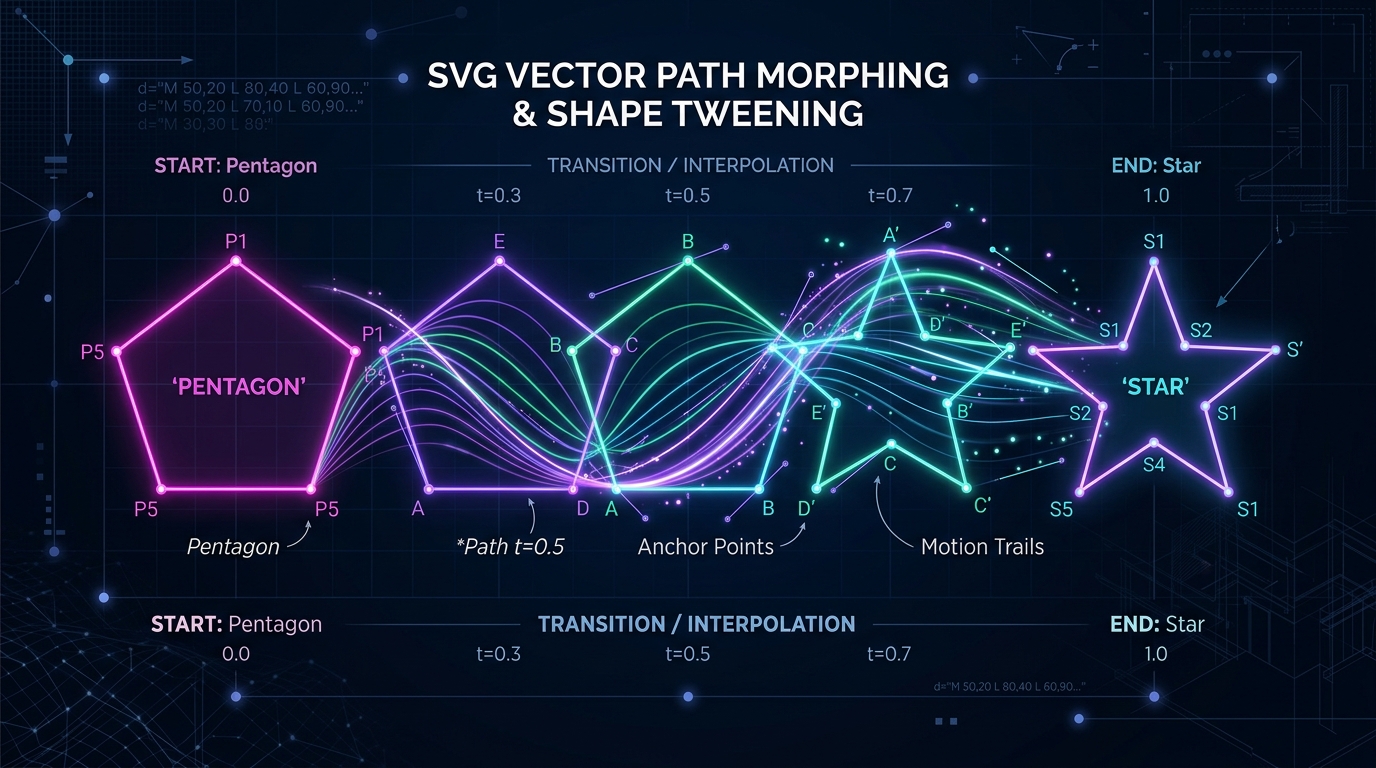
Vector Morphing Engineering Overview: Transforming one SVG shape into another—such as a hamburger menu resolving into an 'X', a play triangle expanding into a pause double-bar, or a search magnifying glass morphing into an arrow—is the pinnacle of UI micro-interactions. However, naive implementations suffer from broken interpolation, visual snapping, and high CPU overhead. This architectural deep-dive covers:
- The Mathematical Invariant: Why browsers require identical point counts, matching command structures, and clockwise winding to interpolate smoothly.
- Cubic Bezier Normalization: Decomposing lines (
L), arcs (A), and quad curves (Q) into universalCcommands. - Native CSS Path Morphing: Leveraging modern
d: path("...")transitions and@starting-stylein 2026 browser engines. - Hardware-Accelerated WAAPI: Running 60 FPS path interpolation off-main-thread via the Web Animations API.
- Algorithmic Libraries Compared: Evaluating Flubber, GSAP MorphSVG, and KUTE.js for bundle size, auto-subdivision, and runtime performance.
- Accessibility & Motion Controls: Enforcing
prefers-reduced-motioncompliance without breaking stateful UI logic.
1. The Fundamental Problem: Why Native Vector Morphing Fails
In web graphics, raster image transitions (like crossfading between two PNGs or WebPs) operate on fixed 2D pixel grids. In contrast, an SVG path is a procedural, mathematical curve defined by its d attribute string:
<!-- Shape A: A simple triangle (4 commands) -->
<path d="M 12 2 L 22 20 L 2 20 Z" />

<!-- Shape B: An octagon (9 commands) -->
<path d="M 7 2 L 17 2 L 22 7 L 22 17 L 17 22 L 7 22 L 2 17 L 2 7 Z" />
If you attempt to animate between Shape A and Shape B using basic CSS transitions:
/* NAIVE APPROACH: FAILS IN ALL BROWSER ENGINES */
.icon-path {
  d: path("M 12 2 L 22 20 L 2 20 Z");
  transition: d 400ms ease;
}
.icon-path.active {
  d: path("M 7 2 L 17 2 L 22 7 L 22 17 L 17 22 L 7 22 L 2 17 L 2 7 Z");
}
The browser engine (Chromium, WebKit, Gecko) will not morph the triangle into an octagon. Instead, it will immediately jump/snap at the midpoint or end of the duration. Why does this happen?
The Path Interpolation Invariant
According to the W3C SVG Paths Specification and CSS Motion Path Level 1, two path descriptions are interpolable if and only if:
- Command List Length Matches: Both paths must have the exact same number of drawing segments.
- Command Types Match: The commands at index
kin both paths must use the identical operator (e.g. if Path A has a Cubic BezierCat segment 3, Path B must also have aCcommand at segment 3). - Coordinate Multiplicity Matches: Each corresponding command must accept the identical number of coordinate parameters.
Because the triangle has 4 commands and the octagon has 9 commands, the browser's interpolation math cannot calculate a midpoint coordinate for vertices 5 through 9 at time t = 0.5. The interpolation is rejected.
2. The Solution: Mathematical Normalization & Vertex Subdivision
To morph any arbitrary SVG vector from IconStash into another, we must preprocess the path definitions through a mathematical normalization pipeline:
Step 1: Absolute Coordinate Unification: Convert all relative lowercase commands (m, l, c, s, q, t, a, z) to absolute uppercase coordinates (M, L, C, S, Q, T, A, Z).
Step 2: Universal Curve Decomposition: Convert all straight lines (L, H, V), quadratic curves (Q, T), and elliptical arcs (A) into mathematically identical Cubic Bezier segments (C).
Step 3: Point Balancing (Subdivision): Insert non-visual "dummy" anchor points along the shorter path until both paths contain identical vertex totals.
Decomposing Lines into Cubic Beziers
A straight line segment from ((x_0, y_0)) to ((x_1, y_1)) can be represented with zero visual deviation as a cubic bezier curve whose control points lie along the straight line at ( rac{1}{3}) and ( rac{2}{3}) of the total distance:
// Mathematical conversion of a Line to a Cubic Bezier
function lineToCubicBezier(x0: number, y0: number, x1: number, y1: number): string {
  const cp1x = x0 + (x1 - x0) / 3;
  const cp1y = y0 + (y1 - y0) / 3;
  const cp2x = x0 + (2 * (x1 - x0)) / 3;
  const cp2y = y0 + (2 * (y1 - y0)) / 3;
  return `C ${cp1x.toFixed(2)} ${cp1y.toFixed(2)}, ${cp2x.toFixed(2)} ${cp2y.toFixed(2)}, ${x1} ${y1}`;
}
Subdividing Segments with Dummy Vertices
Once all commands are cubic beziers (C), you can split any curve segment into two sub-curves using De Casteljau's Algorithm at parameter (t = 0.5). This increases the point count of the simpler shape without altering its rendered geometry by a single pixel.
3. Modern Native CSS Path Morphing: d: path() in 2026
With modern browser engines universally supporting CSS transitions on the d attribute (Chromium 116+, Safari 16.4+, Firefox 119+), you can execute pure CSS path morphing without any JavaScript runtime library—provided your paths are pre-normalized.
Production Example: Hamburger Menu to Close 'X'
Below are two normalized SVG paths for a 24×24 icon canvas. Both paths consist of exactly 4 Cubic Bezier segments with matched coordinates:
<button class="menu-toggle" aria-label="Toggle navigation menu" id="menuBtn">
  <svg viewBox="0 0 24 24" width="32" height="32" fill="none" stroke="currentColor" stroke-width="2.5" stroke-linecap="round">
    <path class="morph-path" />
  </svg>
</button>
/* styles.css - Pure CSS Morphing with 0 KB JavaScript */
.morph-path {
/* State A: Two horizontal bars (Hamburger state) */
d: path("M 4 7 C 9 7, 15 7, 20 7 M 4 17 C 9 17, 15 17, 20 17");
transition: d 350ms cubic-bezier(0.16, 1, 0.3, 1), stroke 200ms ease;
stroke: #F2F2F2;
}
/* State B: Crossed diagonal lines (Close 'X' state) */
.menu-toggle.is-active .morph-path {
d: path("M 5 5 C 10 10, 14 14, 19 19 M 19 5 C 14 10, 10 14, 5 19");
stroke: #C1DD2D;
}Browser Engine Mechanics: Because both path strings contain two sub-paths of identical point topology (M ... C ... M ... C ...), Chromium, Firefox, and WebKit interpolate every anchor and control coordinate frame-by-frame on the compositor thread. The animation runs at a buttery 60 to 120 FPS with zero layout thrashing.
4. Hardware-Accelerated WAAPI (Web Animations API)
When path transitions are triggered programmatically (e.g. based on drag gestures, physics simulations, or audio-reactive inputs), the Web Animations API (WAAPI) provides complete programmatic playback control (pause, reverse, seek, adjust playback rate) without downloading external animation libraries.
Executing WAAPI Morphing in TypeScript
// Animate normalized SVG path via WAAPI
function morphSvgElement(
  pathElement: SVGPathElement,
  startPath: string,
  endPath: string,
  duration = 400
): Animation {
  return pathElement.animate(
    [
      { d: `path("${startPath}")` },
      { d: `path("${endPath}")` }
    ],
    {
      duration,
      easing: 'cubic-bezier(0.2, 0, 0, 1)',
      fill: 'forwards'
    }
  );
}

// Usage with interactive trigger
const pathEl = document.querySelector<SVGPathElement>('#playPausePath')!;
const anim = morphSvgElement(pathEl, PLAY_SHAPE_NORMALIZED, PAUSE_SHAPE_NORMALIZED);

anim.onfinish = () => {
  console.log('Morph transition complete!');
};
Performance Note: WAAPI animations on SVG d properties run significantly faster than requestAnimationFrame loops because browser engines optimize matrix transitions internally in C++ rather than recalculating string concatenations in JavaScript.
5. Algorithmic Libraries Compared: Flubber vs GSAP MorphSVG vs KUTE.js
When morphing complex, organic, or multi-element vector graphics—such as morphing a detailed cloud weather icon into a lightning bolt, or an arrow into a checkmark—manual normalization is mathematically impractical. You need an algorithmic interpolation engine.
| Feature / Metric | Flubber.js | GSAP MorphSVGPlugin | KUTE.js | Native CSS d: path() |
|---|---|---|---|---|
| License | MIT (Free open-source) | Commercial (Club GSAP) | MIT (Free open-source) | Open Web Standard |
| Bundle Impact (Min + Gzip) | ~11.2 KB | ~7.4 KB (+ GSAP core ~26 KB) | ~18.5 KB | 0.0 KB |
| Point Balancing Algorithm | Perimeter-based triangulation | Proprietary auto-subdivision | Uniform point sampling | None (Manual match required) |
| Dissimilar Point Counts | Automatic ((Delta N > 100)) | Automatic ((Delta N > 100)) | Moderate ((Delta N < 30)) | Fails (Must be identical) |
| Shape Origin Rotation Correction | Best-fit rotation alignment | Automatic anchor matching | Manual offset parameter | None |
| Animation Engine Compatibility | WAAPI, Motion One, D3, Framer | GSAP Timeline only | KUTE native runner | CSS transition, WAAPI |
Using Flubber.js with Modern Front-End Frameworks
Flubber is the ideal choice for modern web stacks because it generates a pure mathematical function interpolator(t: number) without forcing you to adopt an entire UI framework:
import { interpolate } from 'flubber';

// Create a smooth interpolator between two dissimilar SVG path strings
const interpolator = interpolate(STAR_SVG_D, HEART_SVG_D, {
  maxSegmentLength: 2 // Subdivides longer segments for ultra-smooth warping
});

// Run with requestAnimationFrame or WAAPI custom worklet
function updateMorph(progress: number) {
  // progress scales from 0.0 to 1.0
  const currentD = interpolator(progress);
  pathElement.setAttribute('d', currentD);
}
6. Common Engineering Pitfalls & How to Avoid Them
Pitfall 1: Winding Direction Inversion (Visual Turning Inside-Out)
Every closed SVG path has a vertex winding order: clockwise (CW) or counter-clockwise (CCW). If Shape A was drawn clockwise in Figma, but Shape B was drawn counter-clockwise, the interpolation math will cause the shape to twist 180 degrees through its center axis during the morph. Solution: Ensure both paths share the same winding direction or use Flubber’s automatic orientation alignment.
Pitfall 2: Disparate viewBox Scaling
If Shape A is drawn on a 0 0 24 24 viewBox and Shape B is drawn on a 0 0 512 512 grid, the morph will wildly translate across screen coordinates. Before normalizing, scale all vector coordinates to a common canvas (e.g. 24×24) using IconStash's standardized viewBox exporter.
Pitfall 3: Compound Multi-Path Mismatches
A single SVG icon may contain multiple disjoint shapes (e.g. the letter 'i' has a stem and a dot: two M...Z sub-paths). If you attempt to morph a 2-part compound path into a 1-part single path, one shape will collapse into a singularity or cause rendering artifacts. Solution: Morph sub-paths individually or use flubber.combine() / flubber.separate() to manage topology changes cleanly.
7. Accessibility & prefers-reduced-motion Standards
Aggressive shape morphing can trigger vestibular disorders and motion sickness in sensitive users. Under WCAG 2.2 Success Criterion 2.3.3 (Animation from Interactions), web applications must respect the user's operating system reduced-motion preference.
Enforcing Reduced Motion in CSS & JavaScript
/* Disable path transitions for users requesting reduced motion */
@media (prefers-reduced-motion: reduce) {
  .morph-path {
    transition: none !important;
  }
}
// Check reduced motion preference in JavaScript
const prefersReducedMotion = window.matchMedia('(prefers-reduced-motion: reduce)').matches;
if (prefersReducedMotion) {
// Instantly apply destination path without tweening
pathElement.setAttribute('d', destinationPath);
} else {
// Execute smooth animated morph
executeMorphAnimation(pathElement, startPath, destinationPath);
}8. Frequently Asked Questions
Why does native CSS path morphing fail when animating between two arbitrary SVG icons?
Native browser interpolation for the CSS d property requires both SVG paths to possess the exact same number of segment commands, identical command types (e.g. M, C, L, Z), and identical vertex ordering. If path A contains 6 vertices and path B contains 14, native CSS cannot map corresponding points and aborts interpolation with an abrupt visual snap.
How does cubic bezier normalization solve the path-matching problem?
Normalization algorithms convert all non-cubic SVG commands (lines 'L', arcs 'A', quadratic curves 'Q', horizontal/vertical lines 'H/V') into mathematically equivalent cubic bezier 'C' segments. Once standardized, subdividing the segments allows dummy points to be inserted along straight lines or curve midpoints until both paths share identical vertex counts.
What is the difference between Flubber.js and GSAP MorphSVG?
Flubber.js is an open-source, zero-dependency triangulation and shape interpolation library (~11 KB minified) that excels at computing custom interpolator functions for WAAPI and Framer Motion. GSAP MorphSVG is a proprietary enterprise plugin (~7 KB) offering automated point auto-routing, shape origin alignment, and multi-path splitting.
Can you animate SVG path morphing purely using the Web Animations API (WAAPI)?
Yes. If the two paths are normalized to identical point structures, you can animate element.animate([{ d: 'path("...")' }, { d: 'path("...")' }], { duration: 400, easing: 'cubic-bezier(0.4, 0, 0.2, 1)' }). In modern Chromium, Firefox, and WebKit, WAAPI executes off-main-thread when possible for 60 FPS hardware acceleration.