SVG Icons vs. Icon Fonts: Why Icon Fonts Are Dead in 2026
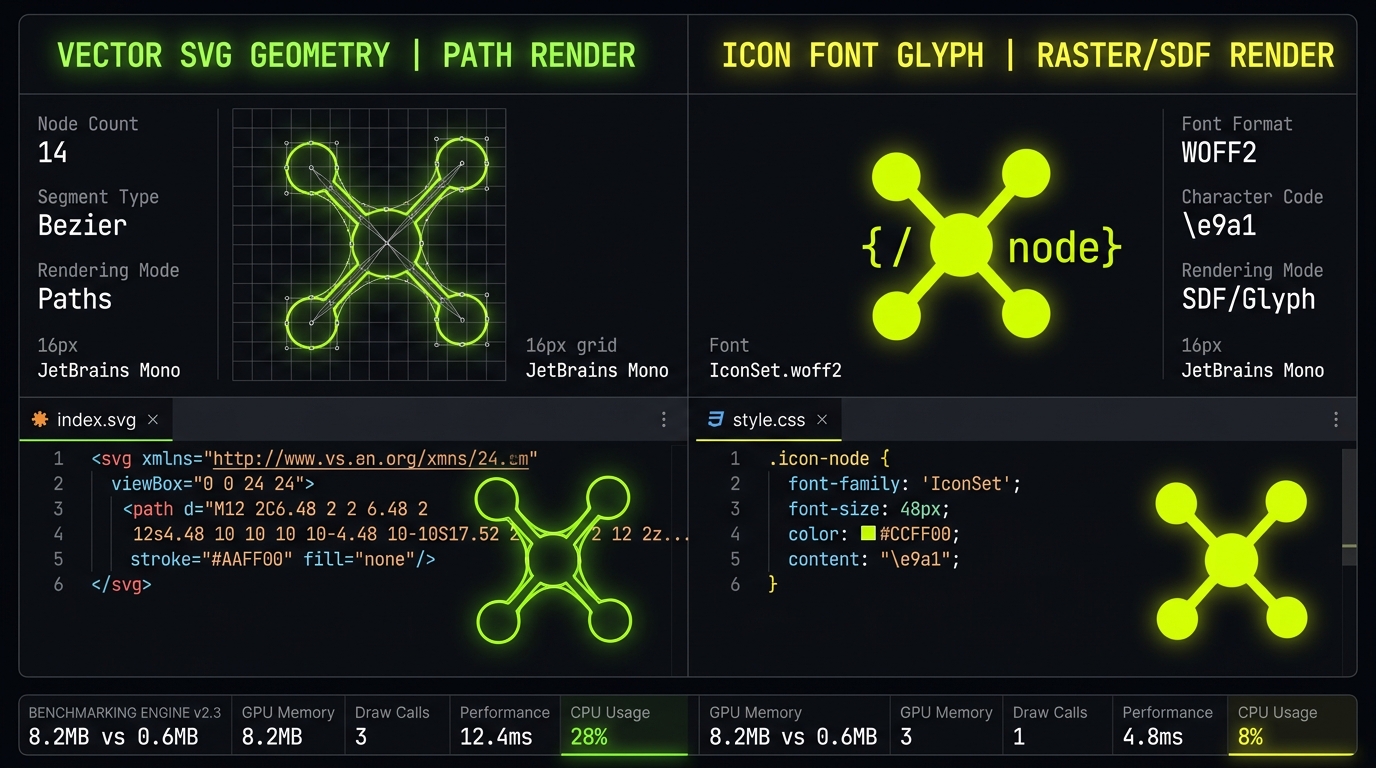
For nearly a decade, icon fonts powered web UI iconography. In 2026, inline SVG vector components have rendered font-based icon sheets obsolete across every critical engineering metric: accessibility, bundle tree-shaking, subpixel antialiasing, and Next.js 15 Server Component streaming.
- Eliminate Flash of Invisible Text (FOIT) and Cumulative Layout Shift (CLS = 0).
- Tree-shake hundreds of unused icons down to strictly the exact bytes rendered on screen.
- Enable multi-tone duotone styling and direct CSS animations impossible with text glyphs.
1. The Accessibility Nightmare of Icon Fonts
Icon fonts rely on mapping individual icons to private-use Unicode characters (PUA). This creates significant accessibility barriers for assistive technology. When a screen reader encounters an icon font tag like <i class="fa fa-user"></i>, it may speak the raw Unicode character or remain completely silent, stripping context from visually impaired users.
Furthermore, if an icon font fails to load (due to adblockers, CDN latency, or unstable mobile connectivity), the browser falls back to a system font, rendering confusing rectangular glyphs or missing elements.
In contrast, inline SVG elements support standard WCAG semantic markup natively:
<svg viewBox="0 0 24 24" width="24" height="24" aria-labelledby="user-title" role="img">
  <title id="user-title">User Profile Settings</title>
  <path d="..." fill="currentColor" />
</svg>
2. Pixel Rendering Quality & Subpixel Anti-Aliasing
Browsers treat icon fonts as text characters. Consequently, they are subjected to OS font smoothing (ClearType on Windows, CoreText on macOS) and subpixel hinting algorithms. At standard UI sizes (16px to 24px), text rasterizers often blur thin icon strokes and distort rounded corners.
SVGs are rendered strictly through browser 2D vector graphic pipelines. Vector paths scale linearly with mathematical precision, guaranteeing razor-sharp boundaries at standard 1x displays and 4K Retina viewports alike.
3. Bundle Payload Bloat & Tree Shaking
When you include an icon font library like Font Awesome, users must download the entire compiled WOFF2 file (often 80 KB to 250 KB) before icons can render, introducing noticeable Flash of Invisible Text (FOIT).
With modern standalone React/Vue/Svelte icon packages (like lucide-react or @tabler/icons-react), modern bundlers (Vite, Webpack, Turbopack) execute strict Tree Shaking. Only the exact SVG paths rendered in your application bundle are shipped, reducing client payload from hundreds of kilobytes to mere fractions of a kilobyte.
4. Technical Benchmark Table
| Feature Metric | Inline SVG Vectors | Legacy Icon Fonts |
|---|---|---|
| Initial Render Speed | Instant (synchronous HTML paint) | Delayed (blocks on WOFF2 network fetch) |
| Accessibility (WCAG) | Native role="img" & <title> |
Poor (private Unicode characters confuse screen readers) |
| Subpixel Precision | Mathematical vector rasterization (always crisp) | Subject to font-hinting blur at 14px–20px |
| Tree-Shaking Support | Full ESM tree-shaking (~1.1 KB per icon) | None (entire 80–250 KB font must download) |
| Color Styling | Multi-color gradients, duotones, stroke control | Monochrome only (single text color) |
| CSS Animations | Path morphing, stroke dashoffset reveals | Basic CSS rotation/scaling only |
5. Frequently Asked Questions
Can I still use icon fonts in 2026?
While possible for legacy projects, icon fonts are strongly discouraged for modern web apps due to accessibility failures, network blocking, and lack of multi-color/stroke customization.
What is the fastest way to migrate from Font Awesome to SVG?
Search for matching icons on IconStash across 134,701 open-source vectors and copy clean, tree-shakeable SVG or React JSX directly.
6. Final Verdict
In modern web engineering, SVG wins on every dimension. Upgrading from icon fonts to modular SVG components reduces page weight, speeds up First Contentful Paint, and guarantees an accessible experience for all users.