IconStash vs Flaticon: Which Icon Site Is Better?
Flaticon is the internet's largest icon marketplace. IconStash is the open-source alternative built for developers. Here's how they actually compare.
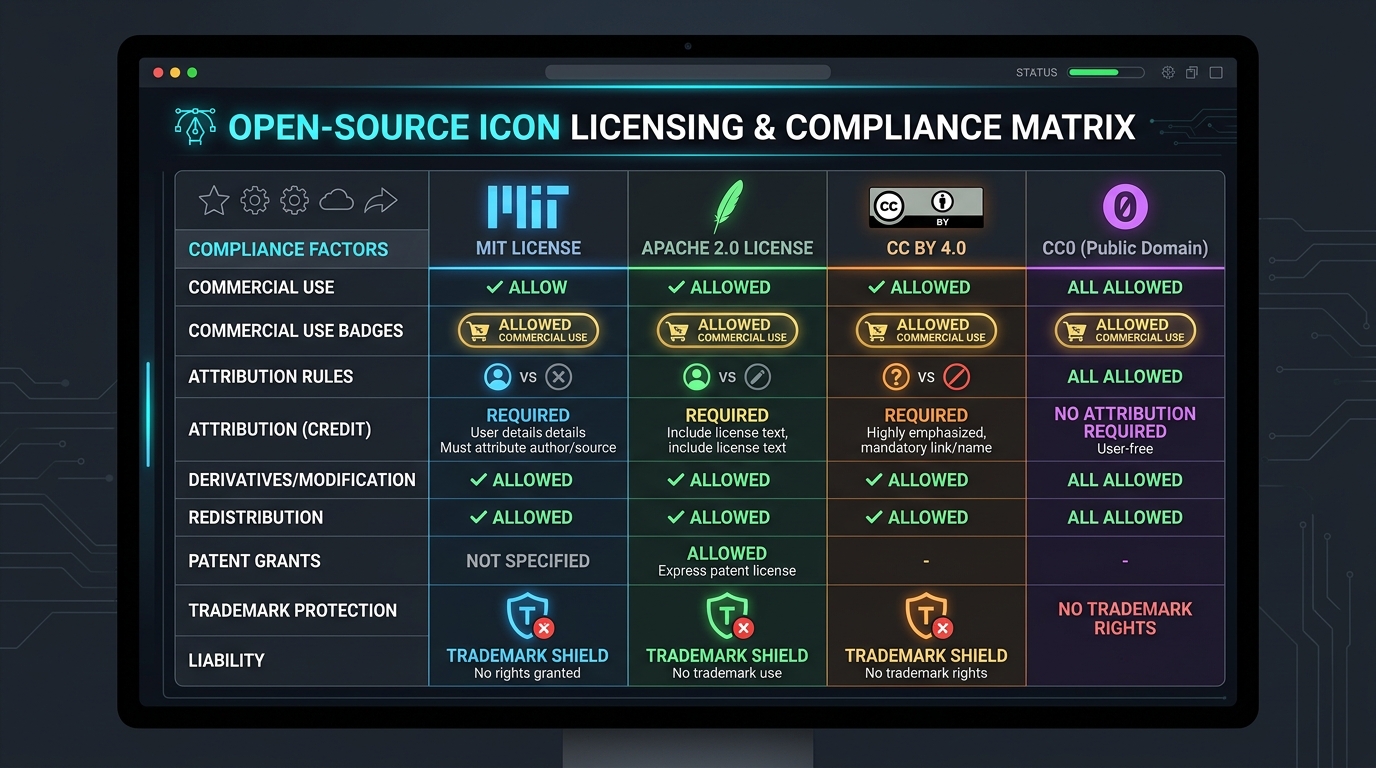
The Two Philosophies
Flaticon (by Freepik) is a marketplace model: millions of icons uploaded by independent creators, monetized through attribution requirements and premium subscriptions. It's the "Shutterstock of icons."
IconStash is an open-source aggregator: it indexes 28 curated icon libraries (Lucide, Tabler, Phosphor, Material, and more) into a single search interface. Every icon is MIT or Apache 2.0 licensed. There's no marketplace, no attribution, no premium tier — because there's nothing to sell.
These are fundamentally different products serving different needs. Let's break down exactly where each wins.
Feature-by-Feature Comparison
| Feature | IconStash | Flaticon |
|---|---|---|
| Total Icons | 134,701 | 10,000,000+ |
| Price | 100% Free | Free (with attribution) / $9.99/mo Premium |
| Attribution Required | Never | Yes (free tier) |
| Commercial Use | Unrestricted (MIT/Apache 2.0) | With attribution or Premium |
| Account Required | No | Yes (for downloads) |
| SVG Download | Yes | Yes |
| PNG Export | Yes (up to 1024px) | Yes (Premium: higher res) |
| JSX / React Export | Yes (one-click copy) | No |
| CSS Sprite Export | Yes | No |
| npm Integration | Install commands per icon | No |
| Customize Stroke/Color | Live preview controls | Limited (editor tool) |
| Cross-Library Search | 28 libraries simultaneously | Single marketplace pool |
| Icon Consistency | Curated sets (same grid/stroke) | Mixed (varies by creator) |
| Illustrated / Colorful Icons | Limited | Massive selection |
| Stickers & Animations | No | Yes |
| API Access | Static JSON (open) | Paid API (Premium) |
| Open Source | Yes | No |
| License Permanence | MIT/Apache (irrevocable) | EULA (can change) |
The Licensing Difference (Why It Matters)
This is the single biggest differentiator. When you download an icon from Flaticon's free tier, you agree to their proprietary license which requires:
- A visible attribution link: "Icon by [Creator] from Flaticon"
- The link must be placed "close to the icon" or in your site's footer/credits
- You cannot redistribute the icon as part of an icon pack or design tool
- Flaticon can change these terms at any time
With IconStash, every icon comes from an open-source repository under MIT or Apache 2.0. These are irrevocable, OSI-approved licenses. You can:
- Use icons in commercial products with zero attribution
- Modify, remix, and redistribute freely
- Never worry about a license terms change (your version is grandfathered forever)
- Skip the legal review step entirely
For agencies building client work, this eliminates an entire category of compliance overhead.
Developer Experience
Flaticon is designed for designers — you browse, download a PNG/SVG, and drop it into Figma or Photoshop. The workflow ends at the file download.
IconStash is designed for developers who also design — or developers working alongside designers:
- One-click JSX: Copy a ready-to-paste React component with proper props
- npm install guidance: Each icon shows the exact package and import statement
- Tree-shaking aware: Import only what you use — no 10MB font files
- Batch export: Select 50 icons, download as a ZIP of SVGs or a single sprite file
- Live customization: Adjust stroke width and fill color before copying code
// From IconStash detail panel → Code tab → Copy JSX
import { Camera } from 'lucide-react';

function Toolbar() {
  return <Camera size={20} strokeWidth={2} color="currentColor" />;
}
Flaticon has no equivalent. You download a file and manually integrate it.
Where Flaticon Wins
To be fair, Flaticon dominates in areas IconStash doesn't target:
- Sheer volume: 10M+ icons vs. 134K. If you need an obscure concept (e.g., "medieval blacksmith hammering an anvil"), Flaticon probably has it.
- Illustrated & colorful styles: Flaticon has thousands of multi-color, 3D, and illustrated icon packs. IconStash focuses on production UI icons (outline, solid, duotone).
- Animated icons & stickers: Flaticon offers Lottie animations and sticker packs. IconStash is static SVG only.
- Icon editor: Flaticon's built-in editor lets you recolor and modify multi-layer icons visually.
If you're a graphic designer making a presentation or marketing asset with colorful illustrations, Flaticon is the better tool. If you're a developer building a product UI, IconStash is purpose-built for you.
The Verdict
Choose IconStash if you're building software.
Zero attribution, developer exports, consistent icon families, and irrevocable open-source licenses make IconStash the superior choice for SaaS products, web apps, mobile apps, and design systems. Choose Flaticon if you need illustrated, colorful, or animated icons for marketing and presentations.
Summary
- IconStash: Free forever, no attribution, developer-first exports, 28 curated libraries, open-source licenses.
- Flaticon: 10M+ icons, illustrated styles, requires attribution or $9.99/mo, marketplace model.
- Best for developers: IconStash — purpose-built for code integration.
- Best for graphic designers: Flaticon — broader visual variety and illustration styles.